AI
AI for CRE: Underwriting Helpers & Rent Roll Cleaning
By Khai Tran · · 5 min read
Use AI to flag rent roll inconsistencies, propose expense categories, and prepare underwriting questions while keeping source checks and decisions with people.
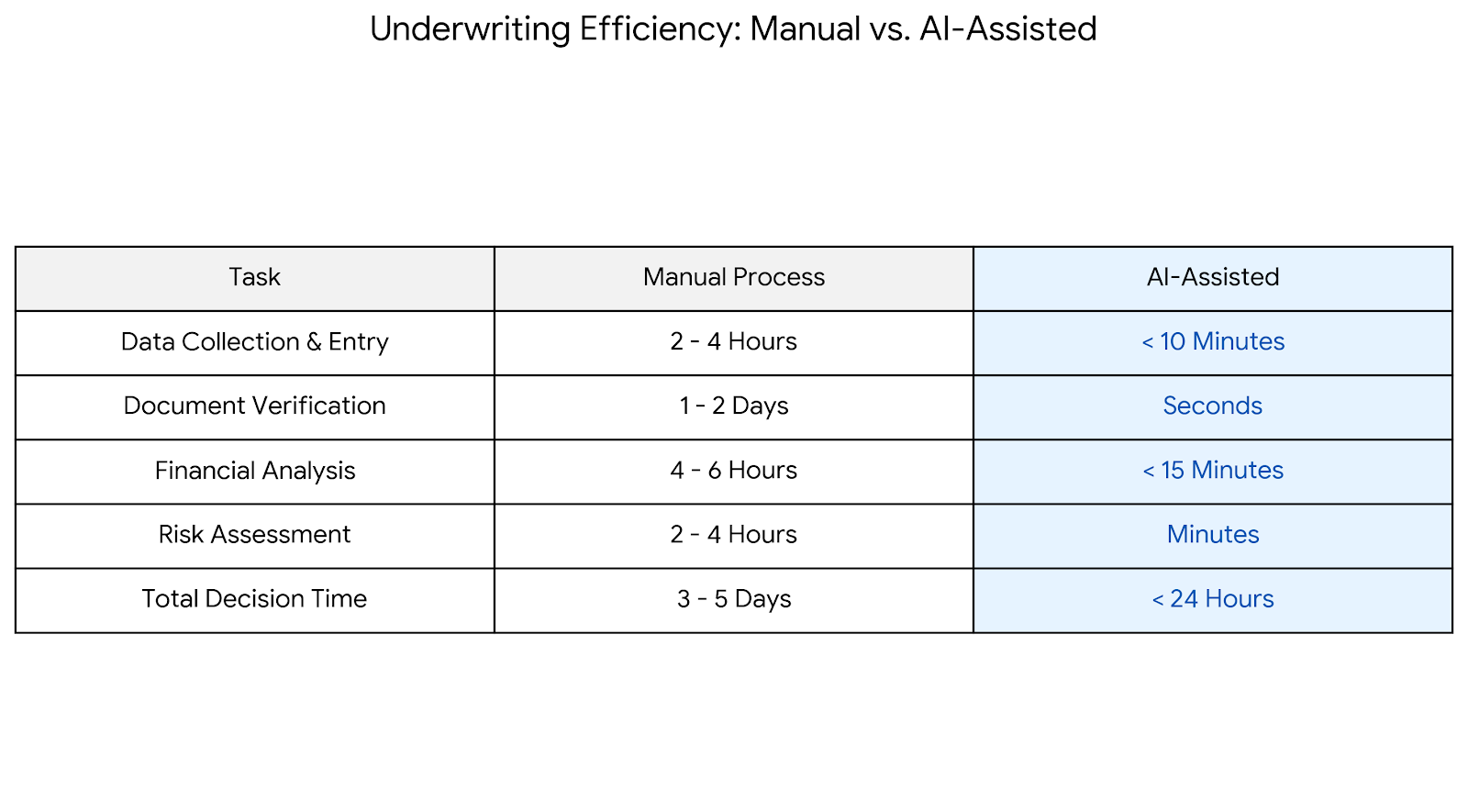
An inconsistent rent roll or a missing expense category can distort an underwriting model. AI can help prepare a list of issues to investigate, but the source documents and calculations still need review.
Use a practice file first. Before processing a client rent roll or T-12, confirm that you are allowed to use that material in the selected tool and that its access and retention settings meet the assignment’s requirements.
The workflows below cover rent roll cleanup, income and expense categories, and a first pass at deal questions.
Where AI Actually Fits in CRE Underwriting
Keep investment decisions and final underwriting with the responsible professionals.
Possible uses include:
- Data cleanup and normalization
- First-pass analysis and checks
- Scenario testing and explanation
Keep source references and a record of any changes to the data.
AI Underwriting Helper #1: Cleaning Rent Rolls (The Right Way)
Rent rolls are rarely clean:
- Inconsistent unit naming
- Mixed date formats
- Missing lease terms
- Notes buried in comments
An AI assistant can propose consistent formats and flag gaps. Check each proposed change against the original rent roll and leases.
Example: Rent Roll Cleaning Workflow
Input: Raw rent roll (Excel or CSV) AI Tasks:
- Standardize unit numbers
- Separate base rent vs. other income
- Flag missing lease start/end dates
- Identify month-to-month tenants
- Highlight inconsistencies
Output: A proposed standardized rent roll and an issue list for review before underwriting.
Prompt Template: Rent Roll Cleanup
Try this sample prompt with data approved for the tool:
“You are a CRE underwriting assistant. Review this rent roll and: 1) Standardize unit names 2) Separate base rent, other income, and reimbursements 3) Flag missing or inconsistent lease dates 4) Identify month-to-month leases Return a clean table and a list of issues to review.”
Review the flagged issues and approve changes before using the table in a model.
AI Underwriting Helper #2: Expense & Income Categorization
Many underwriting mistakes come from misclassified expenses.
AI can:
- Group expenses into standardized CRE categories
- Flag unusual line items
- Compare year-over-year changes
This is especially helpful when sellers provide messy trailing-12s.
Practical Use Case
Upload the T-12 and ask AI to:
- Categorize expenses
- Flag anomalies above a set percentage
- Summarize risks in plain English
Compare the categories and totals with the source statement before using them.
AI Underwriting Helper #3: First-Pass Deal Screening
Use a preliminary review to identify questions for further analysis:
- Ask AI to summarize strengths and weaknesses
- Run basic cap rate and cash-on-cash logic
- Identify assumptions that deserve scrutiny
Verify the calculations in your model and investigate any apparent inconsistency before drawing a conclusion.
Prepare an Explanation for the Investor
Ask for a plain-language draft explaining a specific result:
- “Here’s why NOI dropped”
- “Here’s the risk behind the upside”
- “Here’s what happens if rent growth stalls”
Check that the explanation matches the numbers and does not turn an assumption into a fact.
Guardrails: What AI Should Not Do
AI should not:
- Replace your final underwriting model
- Override market knowledge
- Be presented as the “decision-maker”
A Simple AI Underwriting Stack (No Overkill)
A basic setup can include:
- Spreadsheet (Excel or Sheets)
- AI assistant (for cleanup, summaries, checks)
- Your underwriting model
Keep the source data, proposed changes, and final model separate so you can review how the analysis was produced.
Download the free 5 AI Automations Guide → https://khaitranofficial.com/ai-ops